Embedding a Polyverse Asset is trivial with the functionality provided by the frontend.
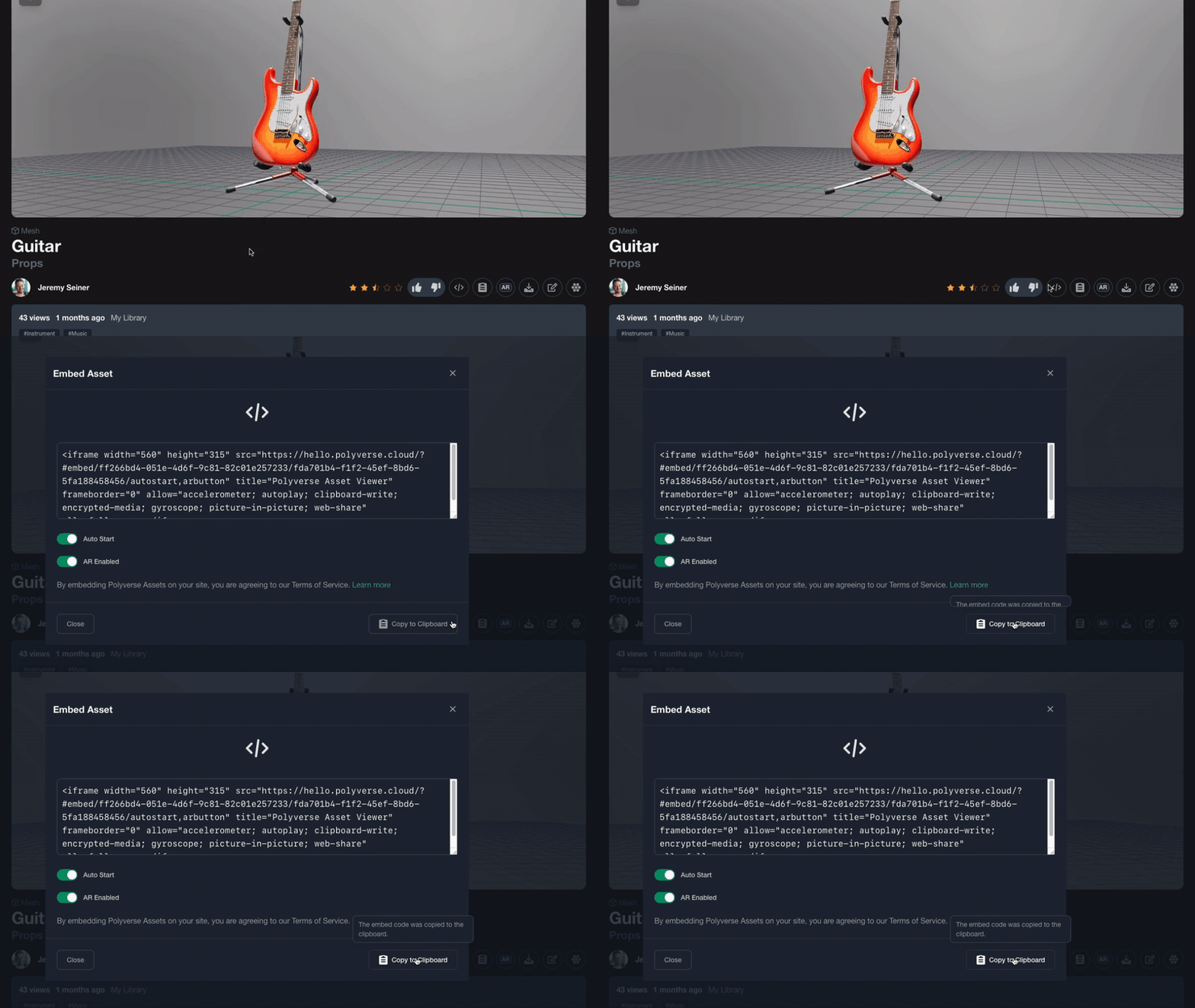
Navigate to the page of an embeddable asset and click the embed button to copy the HTML code to your clipboard.
To embed an asset on your website, insert the code from your clipboard.
¶ JavaScript Polyverse Player API
It's easy to control the Polyverse embedded asset player through its IFrame.
- Create a
MessageChanneland pass it to the IFrame. - Use the
postMessageapi on theMessagePortto send aPolyversePlayerMessageto the player for execution. - Use the
onmessageevent handler on theMessagePortto receivePolyversePlayerMessagefrom the player.
¶ Initializing the API
The following example shows how to initialize the API that allows bidirectional communication with the Polyverse Player, even in a secure context.
// get the player from the page by its ID
const player = document.getElementById(<insert_your_player_iframe_id>);

// initialize the message channel, port1 is used by the page, port2 by the iframe.
const playerMessageChannel = new MessageChannel();

// add event handler to receive messages from the Polyverse Player
playerMessageChannel.port1.onmessage = (event) => {
  // NOTE: the following event is sent, when an `AssetObject` was loaded
  // see below for more events that the player API sends.
  if (event.data?.type == "ViewerAvailable") {
        const assetObject = event.data.value;
    console.log("Loaded Asset with ID=" + assetObject.ID);
  }
};

// NOTE: post the message port when the iframe is loaded, so we can ensure the port is available.
// The port can only be transferred once to the iframe, if the page is not yet fully
// loaded then the player will not be able to handle the message.
// This issue is solved by sending the port through the `load` event
player.addEventListener("load", () => player.contentWindow.postMessage({
        type: "Polyverse.MessageChannel"
}, '*', [playerMessageChannel.port2]);

// Once the `load` event has been posted, the player is ready to receive commands.
¶ Using the Polyverse Player API
Assuimg the load event was called on the page, the player can now receive events.
The following example changes the background color to a dark red:
playerMessageChannel.port1.postMessage({type: "SetBackgroundColor", value: [50,0,0]});
The PolyversePlayerMessage interface is easy to use:
    /**
     * The PolyversePlayerMessage interface represents the object that must
     * be sent through the MessagePort shared with the Polyverse Player.
     */
    interface PolyversePlayerMessage {
        /** The message type. */
        type: "LoadEnvironment" | "SetPosition" | "SetRotationEulerXYZ" |
      				"LoadMaterialVariant" | "OpenAR" | "LoadAssetObjectData" | "FocusScene" |
      				"SetUIVisibility" | "SetBackgroundColor" | "SetAnnotationsVisible" |
      				"SetActiveAnnotation";

        /**
         * If type == `LoadEnvironment`, AssetObjectData of environment to load
         * If type == `LoadMaterialVariant`, AssetObjectAffiliate of the asset
         * If type == `LoadAssetObjectData`, AssetObjectData to load
         * If type == `SetPosition`, [x, y, z]
         * If type == `SetRotationEulerXYZ`, [x, y, z]
         * If type == `OpenAR`, undefined
         * If type == `FocusScene`, undefined
         * If type == `SetUIVisibility`, boolean
         * If type == `SetBackgroundColor`, [r, g, b]
         * If type == `SetAnnotationsVisible`, boolean
         * If type == `SetActiveAnnotation`, { index:number, autoplay:boolean }
         */
        value?: [number, number, number] | string | AssetObjectAffiliate | AssetObjectData | boolean | number;
    }
¶ Receive Messages through the Polyverse Player API
The Polyverse asset player sends events to the page that hosts the player's IFrame (the parent page). The player sends the following messages:
ViewerAvailable: Asset data was loaded and the player will become available.MaterialLoaded: Materials are fully loaded. This event is called for Material assets or when a material variant is loaded on a mesh asset.MeshLoaded: A mesh asset was fully loaded. This event is fired when the mesh and all direct dependencies were loaded.
The player sends the events as an object that matches the PolyversePlayerMessage interface.
To register for the messages, simply subscribe to the message event:
    window.addEventListener("message", (event) => {
  	if (event.data?.type == "MeshLoaded")
      alert("Mesh Loaded");
  });
¶ Getting the AssetObject being loaded
To perform actions based on the loaded object data, the player sends the ViewerAvailable notification once an AssetObject has been loaded. Note that this does not necessarily mean that the player is ready for interaction, as dependencies such as 3D meshes and textures might still be loaded.
In the following snippet, we extend the message handler to intercept the AssetObject that is being loaded by the Polyverse Player.
const fnOnMessage = (event) => {
  if (event.data?.type == "ViewerAvailable") {
    assetObject = event.data.value /* as AssetObject */;
  }
  else if (event.data?.type == "MeshLoaded") {
    didLoadScene = true;
  }
};